


To see who liked an Instagram post, open the post and tap its like count or the “Liked by … and others” text, where available. For a browser-based alternative, DolphinRadar says its Instagram Likes Viewer lets you enter a public username, choose a recent post and review available likers without logging into Instagram.
For an Edinburgh maker sharing a new collection, a food blogger posting a café visit or a community group promoting an event, the total is only a starting point. Looking at which accounts appear across several posts can help you ask more useful questions about engagement, provided you understand the limits of the list.

What does an Instagram liker list tell you?
A liker list is the available set of accounts shown as having liked a particular post. A like count is a total. The two are related, but seeing a total of 200 likes does not mean a viewer has loaded 200 identifiable accounts.
Repeat likers are accounts appearing in the available liker lists for more than one of the posts being compared. DolphinRadar calls its repeat-engagement feature Top Likers: accounts ranked by how often they liked across the recent posts covered by the tool.
That ranking is limited to the posts and data available. It is not an all-time leaderboard, and it does not establish that an account follows the profile. A like also tells you nothing definite about a person’s location, buying intentions or reasons for engaging.
Start with Instagram’s own like list
For a quick check of one post, start in Instagram. Open the photo, carousel or video and look for the like count or “Liked by” text beneath it. Tap or click the available likes information to open the list. The route can differ between the app, website and video formats.
If you manage the account, keep this check alongside your own performance measures. Likes can help describe a response, but enquiries, bookings, link visits or event registrations may be more relevant to what the post was meant to achieve.
How to use DolphinRadar’s Instagram Likes Viewer
According to DolphinRadar, DolphinRadar’s Instagram Likes Viewer lets users browse a public profile’s recent posts and view available post likers. Paid features include searching within loaded liker lists, identifying Top Likers across recent posts and exporting available liker data.
The service supports public target profiles and does not provide access to private target profiles.
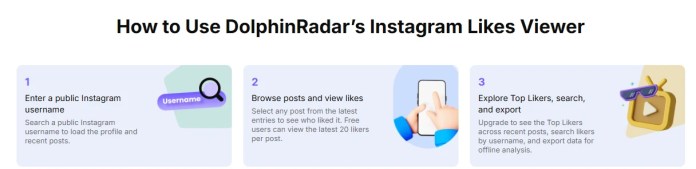
1. Enter the public account’s username
Enter the Instagram username of the public profile you want to review, then start the search. Check that the returned profile is the intended account before loading its recent posts. Similar names can make it easy to select the wrong person or business.
DolphinRadar describes the service as working in a browser without an Instagram login or app download. That is separate from any DolphinRadar subscription or service-account requirements for paid features.
2. Choose a recent post and review available likers
Select the relevant photo, Reel or carousel. Confirm that its content matches the post you intended to examine, then review the available liker records.
The company advertises a free preview of up to 20 likers per post, with no account required for basic access. Treat that as a limited preview. Although the page calls them the “latest 20”, the wording alone does not establish exact like times, chronological ordering or a representative sample of the audience.
Keep the post’s displayed like total separate from the number of records loaded. If only 20 accounts are available, conclusions should refer to those available accounts, rather than everyone who liked the post.
3. Use paid search, Top Likers or export when needed
Paid search can help find a username within the loaded post-liker or Top Likers results. If a username is missing, the accurate conclusion is that it was not found in those results. Its absence does not prove that the account never liked the post.
Top Likers is intended for comparing repeat engagement across covered recent posts. Note the coverage shown in the interface before interpreting a ranking; do not assume a fixed number of posts or a lifetime history.
The paid service advertises access to 1,000-plus likers per post and downloadable post-liker and Top Likers data. These are advertised access levels, rather than a guarantee of every liker on every post. Check the available records, export format and fields before relying on a download.

An Edinburgh example: looking beyond the biggest total
Imagine an independent Edinburgh illustrator reviewing six recent posts about prints, work in progress and an upcoming market stall. This is a hypothetical example, not a report about a real business or a DolphinRadar test.
Suppose one account appears in the available liker data for four posts, while another appears for three. A market announcement has the largest displayed like total, but several repeat likers also appear on the work-in-progress posts.
That would give the illustrator a reason to explore whether process content deserves a regular place in the posting schedule. It would not demonstrate that those accounts are Edinburgh residents, customers or followers, or that process posts caused sales.
A useful next step would be to publish another process post and compare its available engagement with actual enquiries or shop visits. Record the review date, posts covered and loaded-result limits so that the comparison remains understandable later.
Make comparisons you can explain
Before comparing posts, note their publication dates and formats. An older photo has had longer to collect likes than a Reel published this morning. A competition post may also attract a different response from an ordinary update. Those differences matter when deciding what to publish next.
Keep a simple review log with the post, displayed total, loaded liker count and date checked. If coverage changes between checks, record that too. Where records are incomplete, describe the overlap you can actually see rather than turning it into a percentage of the whole audience.
Questions readers often ask
How can I see who liked someone’s Instagram post?
Open the post in Instagram and use its available likes information to view the list. For a supported public profile, DolphinRadar describes an alternative: enter its username, choose a recent post and review available likers.
Can I view post likes without logging into Instagram?
DolphinRadar says its browser-based Likes Viewer does not require an Instagram login. Basic access is a limited free preview; search, Top Likers and export are paid features. No Instagram login does not mean every feature is free.
Why can’t I see everyone who liked a post?
A viewer may load fewer liker records than the post’s displayed total, and visibility restrictions can affect access. DolphinRadar’s free preview is limited to up to 20 accounts per post.
How do I find who likes a profile’s posts most often?
Compare the available liker lists across the posts you are reviewing. DolphinRadar advertises Top Likers for repeat engagement across covered recent posts. Read it within that coverage, rather than as a ranking across the profile’s entire Instagram history.
Can I export Instagram post likers?
DolphinRadar advertises paid exports for individual post-liker lists and Top Likers reports. The useful scope depends on the records available to your access tier. Confirm the current download format, included columns and limits in the service before planning further analysis.
Does the viewer work on private profiles?
No. DolphinRadar’s Likes Viewer supports public target profiles. A private-status label beside an individual liker is an account detail; it does not unlock that liker’s private posts.
Choose the check that answers your question
Instagram’s native list is a useful starting point for one post. For browsing available public-post likers and comparing repeat engagement, DolphinRadar offers a browser-based workflow with a limited free preview and additional paid features. Check current access and subscription details on DolphinRadar.com before choosing a plan.


